Pynk turns a photo of your timetable into a daily plan — classes, tonight's pack list, notes and group projects — then lets you share the parts that matter with family and friends. Nothing public. Nothing sold.
Pick a photo of your timetable. Pynk reads it on your phone and drafts your week — you review and fix anything before it saves.
A short checklist for tomorrow, built from your classes. Tick items off as you pack — nothing left to remember at 8am.
Invite family or friends into your circle. Pin reminders to a shared board — visible only to the people you choose.
Classes, rooms and week patterns in one view — day by day or laid across the week. Mark a class complete as your day goes, and Pynk carries it forward next term.
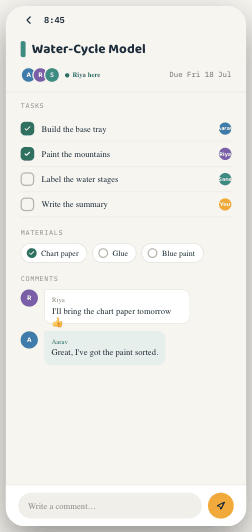
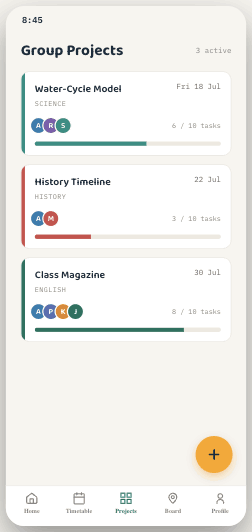
Keep a quick note against a class with a due date, or open a group project with shared tasks, a materials checklist and comments — updated live as your group works.
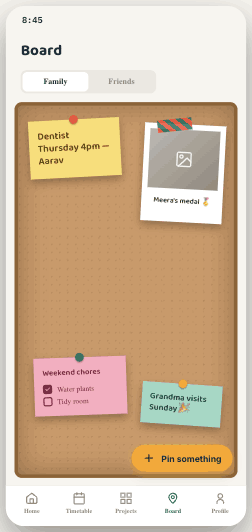
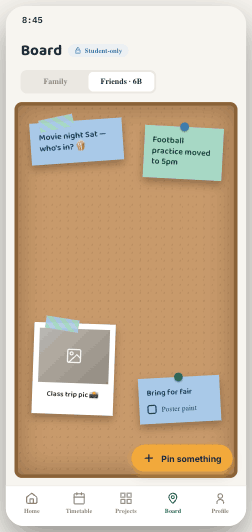
Pin reminders, photos and checklists to a Family board your household can see, and a separate Friends board for your class or circle. The two never mix, and neither is public.
Share a code or QR to bring someone into your circle, then place them as Family — who can follow your day and send a nudge — or Friends, who share boards and projects. Parents link to a child's account the same way, to follow along with the school day.
One invite code or QR, grouped as Family or Friends once they join. Codes expire — nothing's left open.
Parents connect with a short code and follow packing and the school day — without nagging texts, without a school portal.
Sign in with Apple, Google, or an email link. Fast for teens, familiar for parents — one account for the whole household.
Pynk is launching on iPhone and iPad. Sign in with Google, Apple, or an email link — no password to remember.